Google Business Profile, reviews and listings
Business Profile brings your Google Business Profile into MeridianOS™. From here you edit your Google listing, keep your other listings matched to it, answer reviews and publish Google posts.
The page has four tabs: Business Info, Reviews, Posts and Integrations. Everything is locked until you connect Google. You need an admin login to open it.
Connect Google
- Open Business Profile and select Connect Google.
- Choose your Google account.
- Choose your location.
- A location that Google has not verified is labeled (not verified) and cannot be saved.
- Each site connects to one location. To change it, you disconnect first.
- The disconnect dialog lists What stops and What stays before you go ahead.
Stack Digital turns Google features on for your site. Until then, the page shows Google review management is coming soon.
Business Info
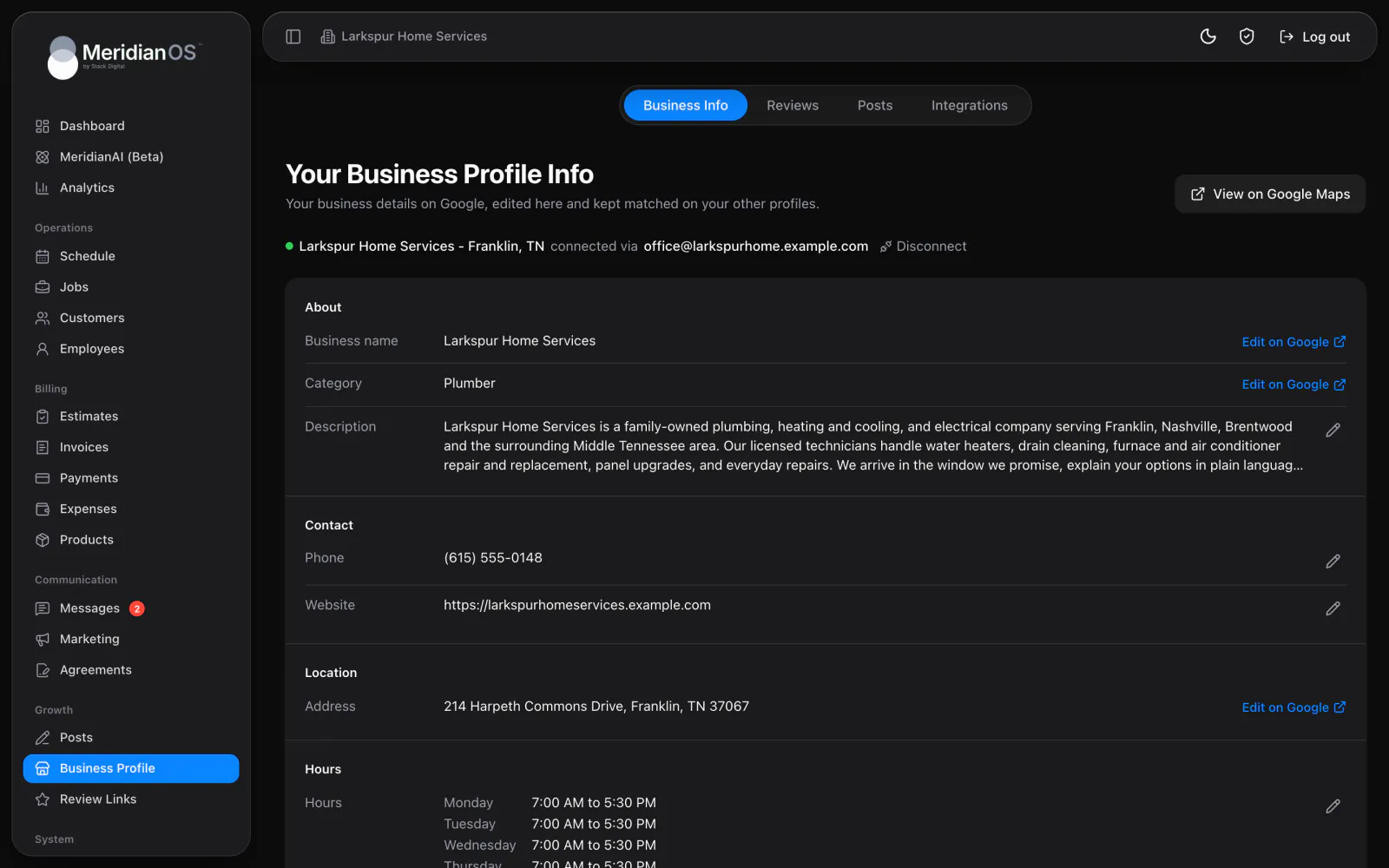
Business Info shows your live Google listing: name, category, description, phone, website, address or service area, hours and holiday hours.
| Detail | How you change it |
|---|---|
| Description | Edit it here, up to 750 characters. Links, emails and phone numbers are blocked, and the page explains why. |
| Phone and website | Edit them here. |
| Weekly hours | Edit them here. A day can have several ranges, run overnight or be set to Open 24 hours. |
| Holiday hours | Edit them here, by date. |
| Name, category and address | These open Google, with a warning that changing them can trigger re-verification. |
Each field can carry a flag. Changed by Google marks a detail that Google edited. Pending on Google marks a change that is still waiting on Google.
Plain-language notices tell you when the listing is not verified, suspended, disabled, a duplicate, temporarily or permanently closed, or claimed by someone else. You also see a notice when Google is signed out or manager access is lost.
Keep your other listings matched
Under Also update, choose which other listings follow when you save your phone, website or hours.
| Listing | How it stays current |
|---|---|
| Facebook Page | A switch for each profile. Facebook is the only social network that receives your business info. |
| Foursquare | A switch. MeridianOS™ finds your existing listing or submits a new one. A new one shows New listing waiting for Foursquare to approve it. |
| Bing Places | A guided one-time setup imports your listing from Google, and Bing Places then syncs daily on its side. When you finish, mark I've set it up. The listing then shows Synced from Google. |
| Apple Maps | A four-step guide covers creating your listing, verifying it and sharing access with Stack Digital. After that, Stack Digital staff update Apple Maps when your details change. |
Apple Maps is a managed service. Stack Digital staff make the updates, and the listing does not sync automatically.
Once every 24 hours, MeridianOS™ compares your Google listing with what it last sent to each connected listing. If a listing has drifted, the details are sent again.
The Reviews inbox
The Reviews tab is an inbox of your Google reviews. Reviews sync automatically, and Sync now fetches them when you want the latest.
Filters with counts let you narrow the inbox: All, Needs approval, Queued, Replied, No action and Skipped.
| Action | What it does |
|---|---|
| Reply | Write a reply yourself. Replies post to Google. |
| Generate response | MeridianAI drafts a reply for you to edit. |
| Edit reply | Change the reply. |
| Skip and Reopen | Skip a review, or reopen it later. |
A queued review shows MeridianAI will reply on followed by the date and time.
Drafting needs MeridianAI set up on your site. Stack Digital turns this on for your site. Until then, a MeridianAI not set up badge shows and Generate response is disabled.
Auto-reply rules
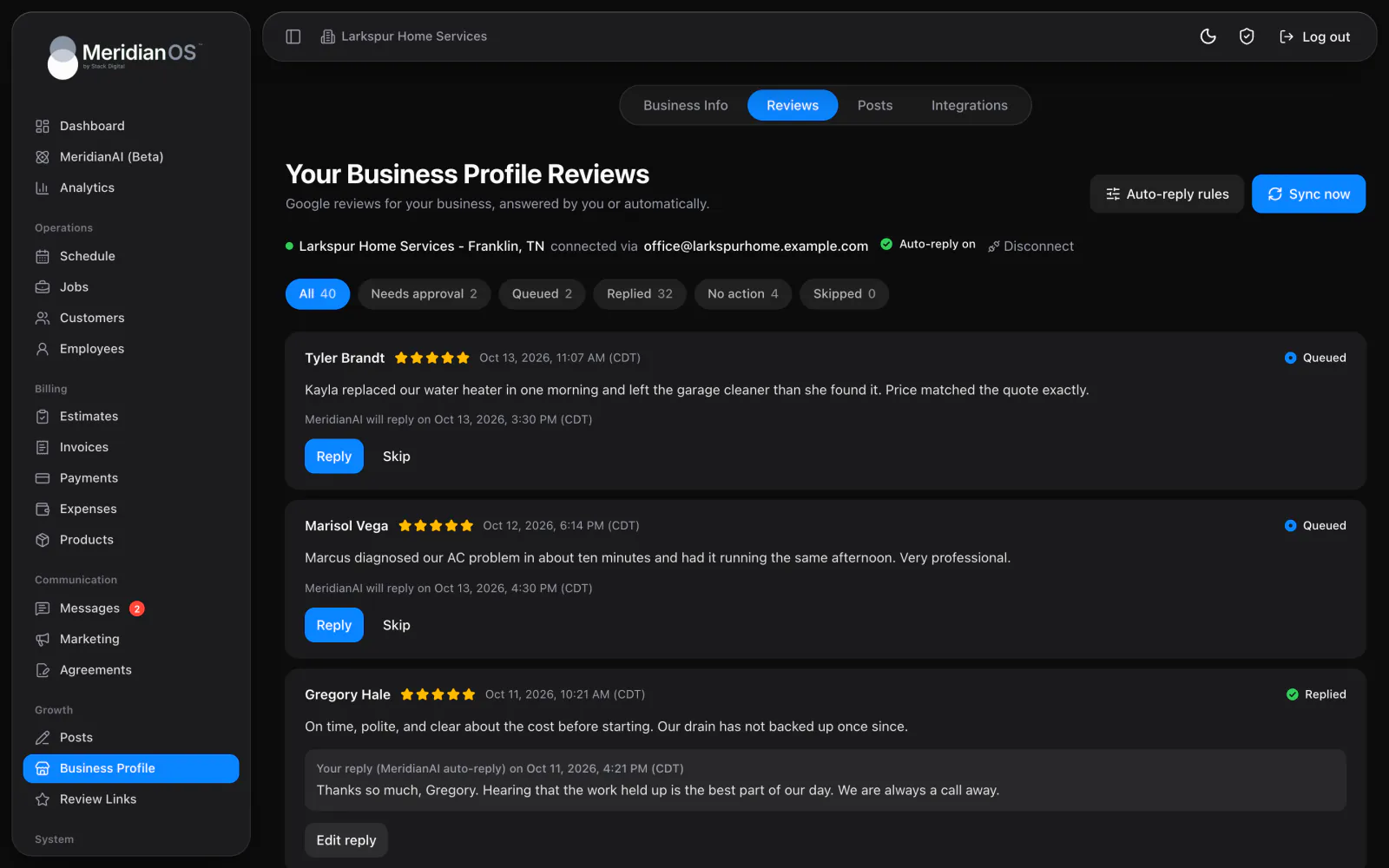
Auto-reply rules decide which reviews MeridianAI answers on its own and when.
| Rule | How it works |
|---|---|
| Star rating | Each rating is set to Reply automatically, Hold for approval or Ignore. By default, 4 and 5 stars reply automatically and 1 to 3 stars are held. |
| Review types | Switches for written reviews, star-only reviews and Only reviews without a reply. |
| Look-back days | How many days back the rules reach. The default is 30. |
| Wait | A minimum and a maximum wait. Each reply waits a random time between the two. The default is 60 to 360 minutes. |
| Allowed hours and days | When replies may go out. The default hours are 8 AM to 6 PM. |
- The wait only counts down while your allowed window is open. A reply does not go out in the middle of the night or seconds after the review.
- If an automatic reply fails five times, the review falls back to manual approval.
Email alerts send review emails to up to 20 addresses. Each address is set to All reviews, 4-5 stars or 1-3 stars.
Replies are written from the MeridianAI Prompt, which you can edit. Restore default brings back the original. The default thanks reviewers by first name and apologizes on low ratings. It never argues, offers discounts or mentions AI.
Google posts
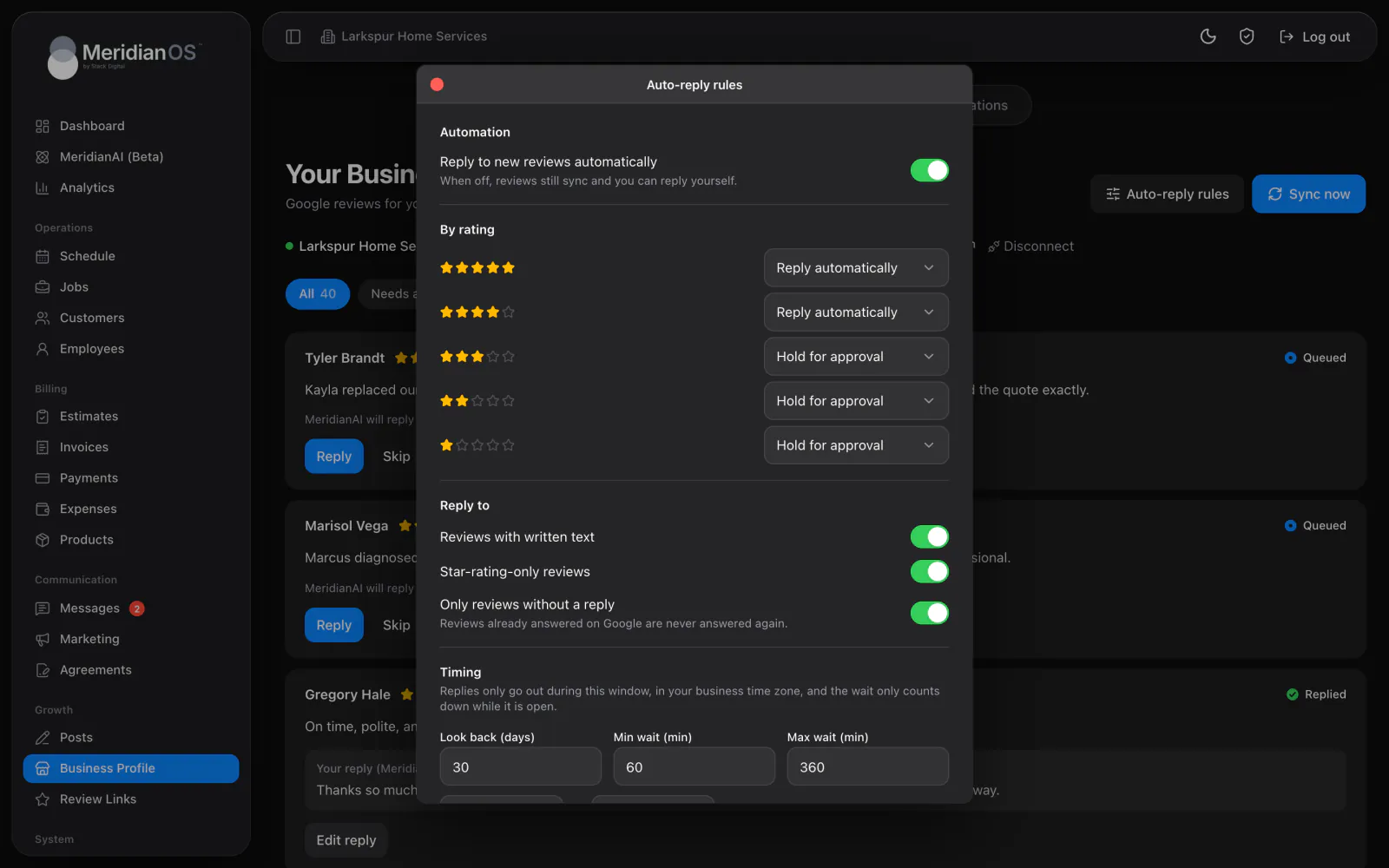
On the Posts tab you write posts for your Google Business Profile. A post can be up to 1,500 characters, and every post can carry an optional Learn More button link.
| Button | What it does |
|---|---|
| Write it for me | MeridianAI drafts the post. |
| Save draft | Keeps the post as a draft. |
| Post now | Publishes the post after you confirm. |
The history shows what was posted and what Google rejected.
Automatic Google posts
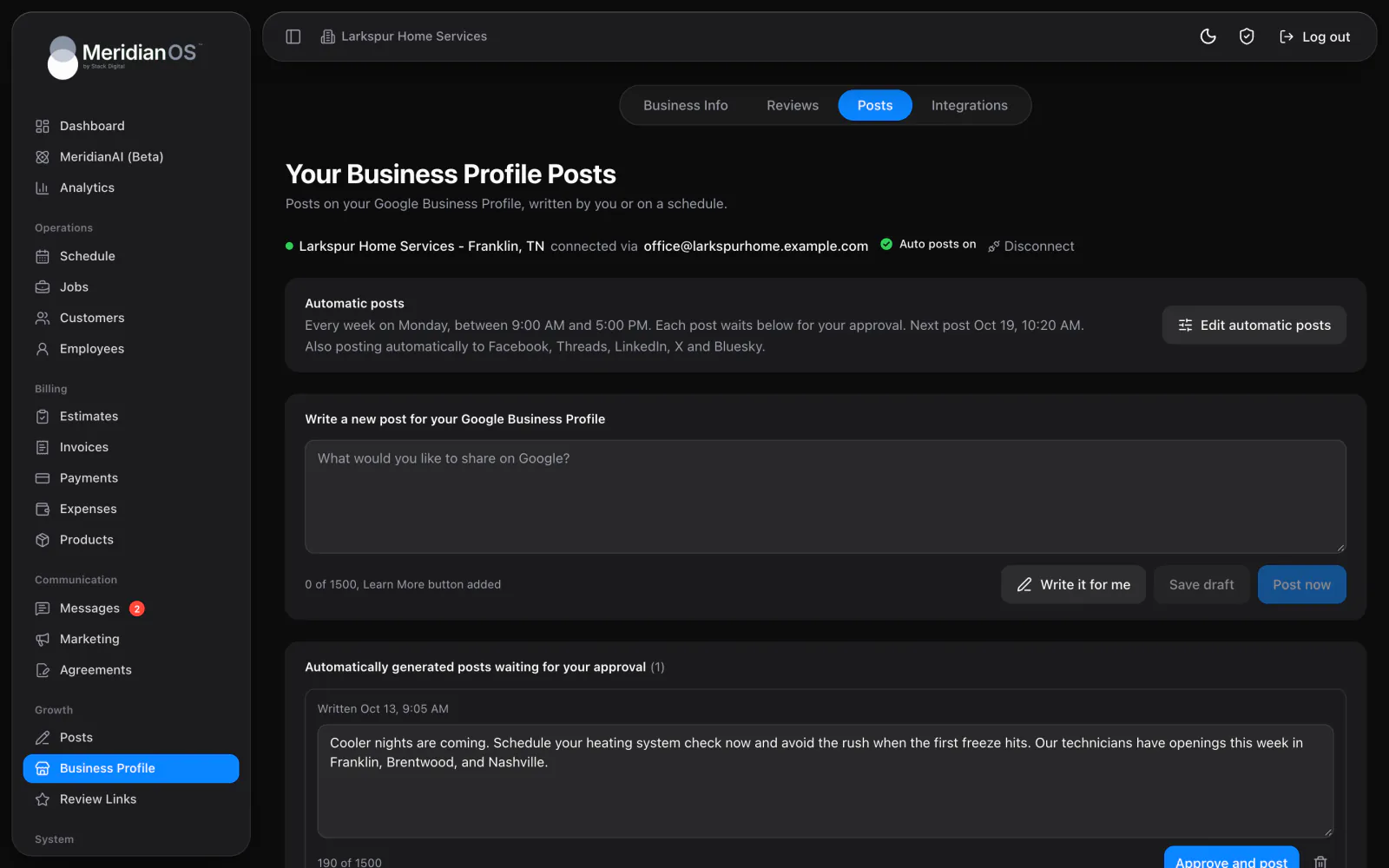
Automatic posts writes Google posts on a schedule. The schedule works the same way as automatic blog posts.
| Setting | Choices |
|---|---|
| How often | Every week, Every other week, Every month or Every quarter. |
| Day and time window | A day, plus an earliest time and a latest time. |
| Post without approval | Off by default, so automatic posts wait for your approval. |
Held posts appear under Automatically generated posts waiting for your approval. You can edit a held post, select Approve and post or discard it.
For Facebook, Threads, LinkedIn, X and Bluesky, see Social posting. To ask customers for reviews, see Review requests and QR codes.
Related
- Social postingConnect Facebook, Threads, LinkedIn, X and Bluesky, then post by hand or on a schedule within each network's limits.
- Review requests and QR codesBuild your review page, send review requests by text, and track scans of each employee's review QR code.
- Blog and automatic postsWrite and publish blog posts on your website, draft them with MeridianAI, and schedule automatic posts.
- MeridianAIHow to talk or type to MeridianAI, what it can look up and change, how it asks first, and how credits work.
- Google reviews overviewEvery review in one inbox, with replies drafted and posted for you.
Updated November 10, 2026.